装置视窗时需要输入产品钥匙。想要从原本的视窗获取钥匙没有那么简单。但跟住以下的步骤就可以把钥匙显示出来。
打开notepad,输入以下代码:
Set WshShell = WScript.CreateObject(“WScript.Shell”)
KeyPath = “HKLM\SOFTWARE\Microsoft\Windows NT\CurrentVersion\DigitalProductId”
MsgBox ExtractKey(WshShell.RegRead(KeyPath))Function ExtractKey(KeyInput)
Const KeyOffset = 52
i = 28
CharWhitelist = “BCDFGHJKMPQRTVWXY2346789”
Do
Cur = 0
x = 14
Do
Cur = Cur * 256
Cur = KeyInput(x + KeyOffset) + Cur
KeyInput(x + KeyOffset) = (Cur \ 24) And 255
Cur = Cur Mod 24
x = x -1
Loop While x >= 0
i = i -1
KeyOutput = Mid(CharWhitelist, Cur + 1, 1) & KeyOutput
If (((29 – i) Mod 6) = 0) And (i <> -1) Then
i = i -1
KeyOutput = “-” & KeyOutput
End If
Loop While i >= 0
ExtractKey = KeyOutput
End Function
把文本后辍换成任意名.vbs就可。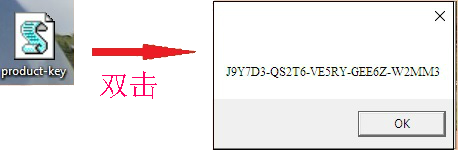
13-10-14
这几天尝试激活电脑,无意中发现代码不能直接从这网页拷贝进去文本里,那是不通的。